🔥Kling Image 4.0: create and edit AI images up to 4K from text and photosStart creating💳Save up to 50% on yearly plans and create moreSee plans✨Write a prompt, add reference photos, pick 1K–4K, and downloadLearn how
Kling Image 4.0 logoKling Image 4.0
  • Home
  • Studio
  • Features
  • Prompts
  • 50% offPricing
  • My Images
  • Blog
Independent online AI image studio

Kling Image 4.0AI Image Generator Online

The Kling Image 4.0 AI image generator turns a text prompt or your reference photos into high-quality images, right in your browser. Fuse up to 10 reference images, edit with plain-text instructions, and export in 1K, 2K, or 4K across 8 aspect ratios.

Plain-English prompts
1K to 4K output
Kling Image 4.0Image generation · Photo editing

JPG · PNG · WebP, 20 MB each · up to 10 photos (up to 4 photos of real people)

4 credits per image
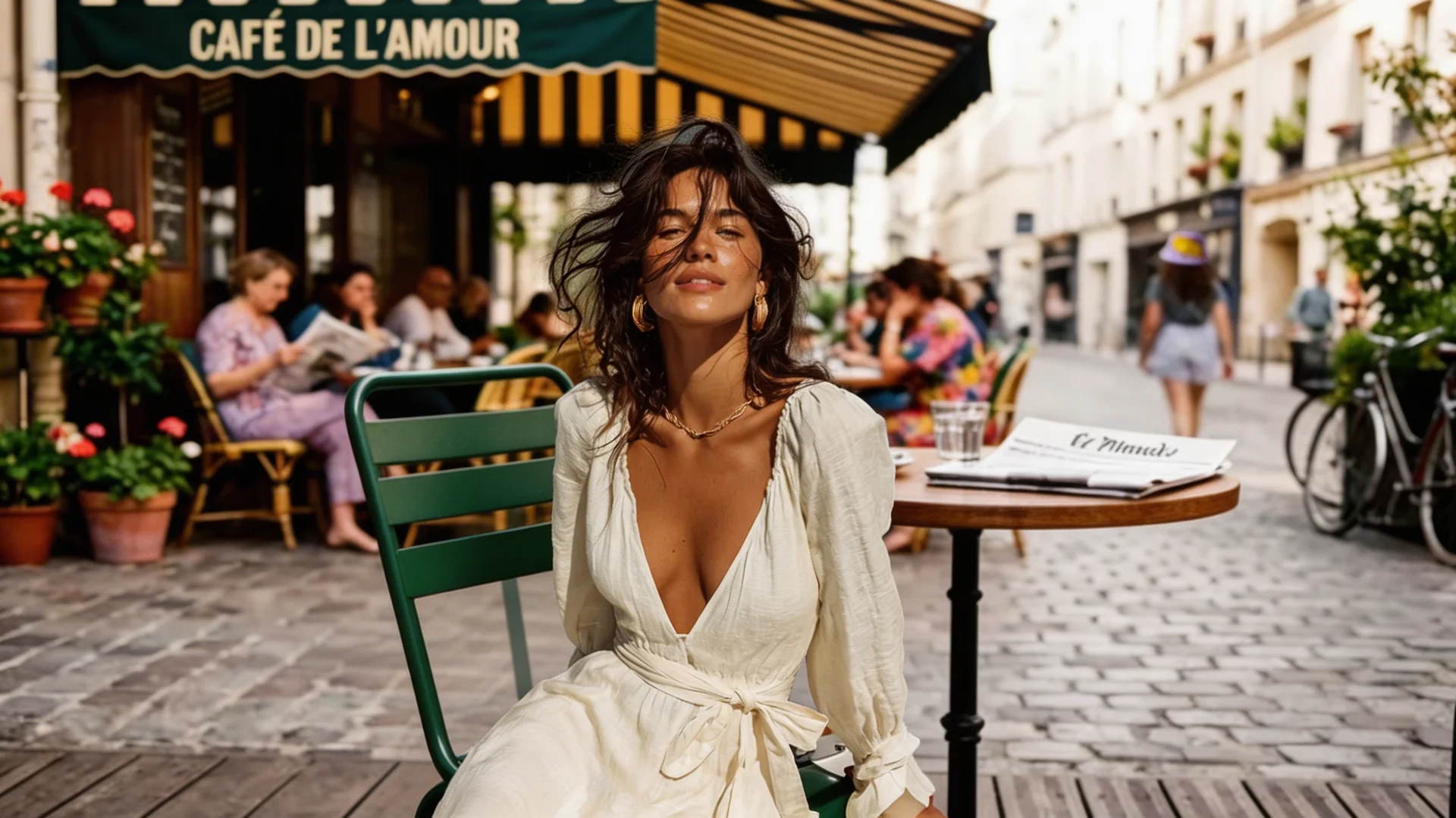
Kling Image 4.0 example: a portrait at a sunny outdoor café
Example result · try starting with the café portrait prompt.

No photo needed to get started. Describe the scene you want, review the result, and refine your prompt step by step.

Features

Kling Image 4.0 AI image generator features

Modeled on the features of Kling's image models, the Kling Image 4.0 AI image generator puts text-to-image, multi-reference fusion, instruction editing, and style transfer on one screen.

TextText-to-image

Describe it in plain English

Write the subject, setting, lighting, lens, and mood in one sentence, and the Kling Image 4.0 AI image generator turns it into a finished image. No prompt syntax to learn.

Example prompts built into the studio

10Reference images

Fuse references and edit with a sentence

Upload up to 10 reference images and blend their features into one picture, or add, remove, and change elements by describing the edit while the original style and lighting stay intact.

JPG · PNG · WebP, 20 MB each

4KMax resolution

1K, 2K, and 4K output

Draft at 1K, then export 2K or 4K finals in 8 aspect ratios, from 1:1 squares to 21:9 banners, for thumbnails, product pages, and posters.

1K, 2K, 4K

Kling Image 4.0 use cases: what can you create?

Product ads and store listings

Turn one product photo into studio shots, lifestyle scenes, and ad visuals for your store or campaign.

Portraits and profile photos

Create portraits with the mood you want, from cinematic lighting to editorial and double-exposure looks.

Characters, 3D, and illustration

Use style transfer to restyle a photo as anime, watercolor, pixel art, a 3D cartoon, or a pencil sketch, and keep the same character across a series.

Social posts and thumbnails

Make on-brand visuals in the right size for feeds (1:1), stories (9:16), and video thumbnails (16:9).

Studio specs

Kling Image 4.0 vs. typical online AI image generators

FeatureKling Image 4.0 studioTypical AI image tools
Reference photosUp to 10 per image to keep people and products consistent1–2 references, or none
Resolution1K, 2K, 4KOften a single fixed size
Aspect ratios1:1, 16:9, 9:16, 4:3, 3:4, 3:2, 2:3, 21:9A few preset ratios
Photo editingAdd, remove, or change elements with a sentence; swap backgrounds and lighting; restore old photosMostly new images only
Failed generationsCredits are returned automaticallyVaries by tool

Kling Image 4.0 prompt examples

Browse sample images with the exact prompts behind them. Copy a prompt, or click "Use this prompt" to load it into the Kling Image 4.0 studio above and tweak it before you generate.

Surreal Baroque luxury perfume ad

A teal floral perfume bottle with an ornate gold cap floats above a rustic table, surrounded by symbolic objects in a moody Dutch Golden Age still life.

Watercolor forest clearing with volumetric light

A forest clearing with a stream in delicate, translucent watercolor: soft wet-on-wet washes, crisp natural edges, and no outlines or line work.

Restore and colorize an old photo

Upload an old photo and restore it into a sharp, realistic, colorized image while keeping the original composition, pose, and face exactly as they are.

Modern cinematic 3D character render

Turn a character into a modern cinematic 3D render with high-fashion contrast, filmic color, subtle bloom, and realistic materials.

Double exposure portrait with a lake landscape

A side-profile double exposure portrait blended with bare branches, with a misty mountain lake and a tiny figure inside the silhouette.

Grocery stores through the ages, 3x3 grid

A 3x3 grid of 1:12 scale 3D miniature dioramas showing grocery stores from 300 BC to the year 2500, lit by warm afternoon sun.

Cinematic golden hour portrait

A young woman with short dark curls leans against a concrete wall as golden hour sunlight casts dramatic window shadows, shot on an 85mm lens.

Surreal glitch-art cat in virtual reality

A surreal cat in a glitch-art virtual reality space, fusing digital distortion with VR elements in a high-contrast orange and cyan palette.

See all 21 Kling Image 4.0 prompts
Service facts and limits

What to know before using Kling Image 4.0

Kling Image 4.0 (klingimage4.art) is an independent web service for creating and editing images from text prompts and reference photos. It is not an official Kling AI product and is not affiliated with Kuaishou. You can start in your browser with no installation and create ad creatives, social posts, product images, and thumbnails up to 4K.

Is Kling Image 4.0 an official Kling AI model?

No. "Kling Image 4.0" is the name of this independent tool. As of November 2026, Kling AI's latest official image models are IMAGE 3.0 and IMAGE 3.0 Omni (released February 5, 2026), and Kling 4.0 is Kling AI's video model.

Which reference photos can I use?

You can add up to 10 JPG, PNG, or WebP photos (20 MB each) to one generation, including up to 4 photos of real people. Combine people, products, composition, lighting, and style to design the scene you want.

What are the limits of AI-generated images?

The same prompt can give different results, and small text or complex hands may not come out right. Before publishing, check the image, any text in it, and your rights to the source material.

How are my uploads handled?

Your photos, prompts, and results are sent to and stored with cloud services only as needed to generate images and keep your history. See the Privacy Policy for how data is used, shared, kept, and deleted.

How to use the Kling Image 4.0 AI image generator in 3 steps

Write a prompt or add reference photos, choose a resolution and aspect ratio, then generate.

01

Write a prompt or add photos

Describe the scene you want, or upload up to 10 reference photos and say what should change.

02

Set resolution and aspect ratio

Choose 1K, 2K, or 4K and one of 8 aspect ratios: 1:1, 16:9, 9:16, 4:3, 3:4, 3:2, 2:3, or 21:9.

03

Review and download

Check the finished image, download the full-resolution file, or keep editing.

Limited-time pricing

50% OFF

Ends in
--
H
--
M
--
S
Kling Image 4.0 pricing

Kling Image 4.0 Pricing

Choose credits and a plan that match how many images you make and the resolution you need (1K to 4K).

50% OFF

Basic

$9.90/month
$238.80$118.80/year

Best for getting started


  • 3,000 credits per year · 250 credits added monthly
  • Up to 750 Kling Image 4.0 1K images per year
  • Included features
    Text-to-image
    Photo editing
    Up to 4K
  • Unused monthly credits automatically roll over to the next month
  • Monthly credits included
  • Image generation up to 4K
  • Private generations
  • Commercial use
  • Standard speed
  • No team seats
  • No priority queue
Popular
50% OFF

Pro

$23.33/month
$562.80$279.90/year

For creators and professionals


  • 7,680 credits per year · 640 credits added monthly
  • Up to 1920 Kling Image 4.0 1K images per year
  • Included features
    Text-to-image
    Photo editing
    Up to 4K
  • Unused monthly credits automatically roll over to the next month
  • Monthly credits included
  • Image generation up to 4K
  • Private generations
  • Commercial use
  • Faster queue
  • Priority support
  • History saved
    50% OFF

    Enterprise

    $52.40/month
    $1,258.80$628.80/year

    For teams and studios


    • 17,400 credits per year · 1,450 credits added monthly
    • Up to 4350 Kling Image 4.0 1K images per year
    • Included features
      Text-to-image
      Photo editing
      Up to 4K
    • Unused monthly credits automatically roll over to the next month
    • Monthly credits included
    • Image generation up to 4K
    • Private generations
    • Commercial use
    • Fastest queue
    • Team-ready support
    • Extended history

      Safe, secure payments

      Pay with major credit and debit cards at checkout. Available payment options can vary by card issuer and location.

      VisaMastercardAmerican ExpressJCBDiscoverUnionPay
      Secure checkout via Stripe. A refund is issued if generation fails.Payment questions: support@klingimage4.art
      Kling Image 4.0 FAQ

      Kling Image 4.0 frequently asked questions

      Answers about free credits, pricing, resolutions, reference photos, failed generations, and commercial use.

      1

      What is the Kling Image 4.0 AI image generator?

      Kling Image 4.0 is an independent online AI image generator at klingimage4.art. Create images from a text prompt, or upload up to 10 reference photos and edit them with plain-text instructions, right in your browser with no installation.

      2

      Is Kling Image 4.0 an official Kling AI or Kuaishou product?

      No. This site is a third-party tool and is not affiliated with Kuaishou or Kling AI. "Kling Image 4.0" is the name of this site's generator. As of November 2026, Kling AI's latest official image models are IMAGE 3.0 and IMAGE 3.0 Omni, and Kling 4.0 is Kling AI's video model.

      3

      Can I try Kling Image 4.0 for free?

      Yes. New accounts can receive free starter credits to test generation and editing, and daily check-in rewards may add more. When you need more images or 4K output, you can buy a plan or a credit pack.

      4

      How many credits does one image cost?

      It depends on the resolution: 4 credits for 1K, 6 for 2K, and 8 for 4K. Using reference photos adds 1 credit. See the pricing page for current plans and credit packs.

      5

      Which resolutions and aspect ratios are supported?

      You can choose 1K, 2K, or 4K output and 8 aspect ratios: 1:1, 16:9, 9:16, 4:3, 3:4, 3:2, 2:3, and 21:9. These follow the options Kling AI lists for its own image models.

      6

      How many reference photos can I upload?

      Up to 10 JPG, PNG, or WebP photos per generation, 20 MB each, including up to 4 photos of real people. The Kling Image 4.0 AI image generator blends them to keep a face, outfit, or product consistent while you change the background, lighting, or style.

      7

      What happens to my credits if a generation fails?

      If a generation does not finish because of a system error or a safety filter, the credits used for it are returned to your account automatically.

      8

      Can I use Kling Image 4.0 images commercially?

      Subject to our Terms of Service and applicable law, you can use the images you generate for personal and commercial projects such as websites, thumbnails, and ads. You are responsible for having the rights to any photos you upload.
      Try the Kling Image 4.0 AI image generator today

      Turn the visuals in your head into finished images with a simple prompt.

      Output up to 4K
      Up to 10 reference images
      Credits returned if a generation fails

      Kling Image 4.0 guides and pricing

      Read prompt tips and resolution advice, compare plans, and start creating AI images today.

      Blog guide

      What Is Kling Image 4.0? A Guide to This Independent AI Image Generator

      Learn what Kling Image 4.0 on klingimage4.art is, how it relates to Kling AI's official image models, and how to create your first image from text or photos.

      Pricing

      Kling Image 4.0 plans and credits

      Compare plans and credit packs for the number of images and the resolution (1K to 4K) you need.

      About

      Who runs Kling Image 4.0

      An independent, unofficial tool. Learn about the team and how to reach support.

      Kling Image 4.0 logoKling Image 4.0
      support@klingimage4.art
      Product
      • Kling Image 4.0
      • Features
      • Prompt examples
      • Pricing
      • FAQ
      • Blog
      Company
      • About
      • Contact
      Legal
      • Privacy Policy
      • Terms of Service
      • Cookie Policy
      Free AITurbo0Twelve ToolsWired BusinessAiTop10 ToolsShow Me Best AIMossAI ToolsDokey AIHo ToolsTierlifyAI Blog ToolsNav-AIAI DirsArtificinNovaTools AIFindly ToolsSubmit AI ToolsSee What New AIFazier
      © 2026 Kling Image 4.0. All rights reserved.

      Kling Image 4.0 (klingimage4.art) is an independent, unofficial AI image tool. It is not affiliated with, endorsed by, or operated by Kuaishou or Kling AI. "Kling" is a trademark of Kuaishou.

      Company: Yiwu Weidong Trading Co., Ltd. · Representative: Deng Xiaoshan · Unified Social Credit Code (China): 91431103MA4R2EEB79 · Address: No. 350 Beiyuan Road, Beiyuan Subdistrict, Yiwu, Jinhua, Zhejiang, China